


TechConnect Zoom New Account Instructions
TechConnect Zoom is a video conferencing tool in Canvas. There are two steps to follow to request your account.
Step 1:
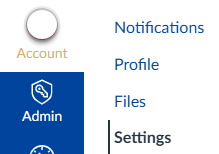
Make sure your @fullcoll.edu email address is the default email address in your Canvas account. To verify this, select your account in the blue Canvas global navigation menu and go to Settings.
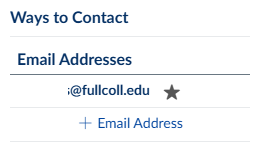
Check the email addresses listed under Ways to Contact on the right side of your screen. Your @fullcoll.edu address should have a star beside it. If it does not, hover over the email address and a faint gray star will appear. Click that star icon to make your @fullcoll email the default.
Step 2:
Email ACTHelpDesk@fullcoll.edu to request your TechConnect Zoom account.