Distance Education Department News – Spring 2023
Welcome to the Fullerton College Distance Education News! We have lots of updates for the end of the Spring 2023 semester and even more to come as we look forward to Fall 2023.
DE Office Growth
An instructional designer, Cory Thomas, was added to the Distance Education department in February of 2023. She has been working on a backlog of DE tasks and assisting with the CVC-OEI Peer Online Course Review process. Cory is also available for instructional design and accessibility consultations. You can schedule a virtual appointment using the Distance Education booking calendar, which can also be found in the Contact Us section on the Distance Education home page.
In other exciting news, the Distance Education office has secured a home! In Fall 2023, DE will be in rooms 516 and 518, which were the former home of the Veteran’s Resource Center. The location is not quite ready to welcome faculty and students, but the computer lab has been set up with ten computers. The larger co-working space is being cleaned and prepared for furniture and equipment. It will be set up to accommodate an administrative assistant and student “tech rangers.”
CVC-OEI Updates
Fullerton College is now a Home College. This means our students can currently take courses through the exchange. Students can visit the CVC Online Courses webpage and enroll in online courses offered at California Community Colleges designated as teaching colleges. Fullerton College should be a teaching college by late August or early September. More information on the CVC is available on the CVC-OEI Update page.
UDOIT Advantage
As Fullerton College continues our ongoing efforts to help faculty and staff create accessible Canvas courses and department shells, we will be upgrading the UDOIT Cloud accessibility tool. UDOIT Cloud can currently be used to check for accessibility errors in your Canvas Pages, Assignments, Quizzes, etc.
With the new version faculty will also be able to:
- Rapidly scan all files (PDF, Word docs, etc.) in a Canvas course to detect potential accessibility issues
- Generate more accessible formats of a file with a click of a button
- Easily replace course files with more accessible formats
- Keep track of which files have been reviewed and remediated
Check out this short video for an overview:
Pronto Upgrades
You can manage some settings in Pronto by visiting the Pronto administration site. Pronto has made many upgrades:
- Use Pronto for meetings/office hours
- Faculty can be in Pronto class groups – teachers can now automatically be pulled into the student groups that are created in Canvas. Watch this video to see how to adjust the settings that put you in student groups.
- Faculty/Classroom Announcement Groups – by going into settings inside an individual group, you can now change the permissions for any group from the regular chat you know and love into a “message board” or “announcement feed” type chat.
- Announcements – every teacher has permission to send announcements to their individual classes or multiple classes right inside of Pronto, which means push notifications are sent to each student’s phone! You can see who read the announcements and schedule announcements all within the Pronto mobile or web app.
Templates
Distance Ed has created a variety of different Design Tool templates and content blocks that faculty can drop right into their Canvas courses. Check out the template page on our website to see all of the options!
Upcoming Training Opportunities
Canvas Colony – share online teaching ideas and experiences with other Fullerton College professors.
PlayPosit Summer Webinar Series – every Thursday at noon, June 8 – August 3. Learn how to use the powerful interactive video tool.
Pronto self-paced training to launch in early July.
Tailoring your Assessment to Increase Student Success – Assessment in the online environment differs from in the face-to-face class. It is easy to focus on the pitfalls, but this course will show you how to use online assessment to create radically student-centered courses. Learn to modify current assessment settings to encourage continued learning for your students. Learn how to use Canvas tools for authentic assessment. Empower your student! Transform lives! Inspire positive change!
Universal Design for Learning (UDL) – a self-paced course designed to give participants an introduction to Universal Design for Learning (UDL) and an opportunity to fulfill the online teaching recertification requirement if needed. The course has five modules and should take approximately 3-5 hours to complete.
WebAim Accessible Document Training – sponsored by the CCC Accessibility Center. This self-paced Canvas course covers: creating accessible document content and structure in Word & PowerPoint, evaluating the accessibility of well-structured Word & PowerPoint documents, optimizing the accessibility of PDFs exported from well-structured Word & PowerPoint documents with Acrobat, and creating accessible document content and structure in Excel (bonus module). This course normally costs $125 but is currently free for CCC faculty and staff.
Recertification & Online Course Survey Reminders
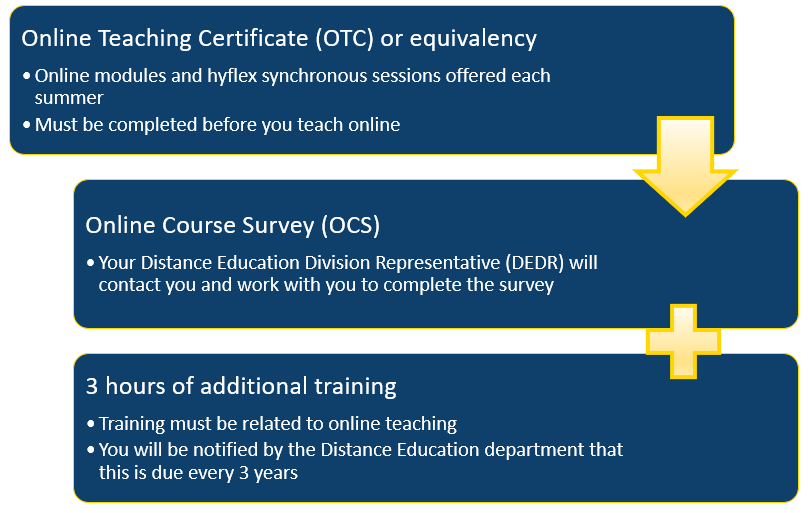
After obtaining initial online teaching certification through one of the options listed above, faculty must do the following every three years to remain certified:
- Online Course Survey
- Three hours of professional development focused on online teaching every three years.
- Professional development options can include:
- Fullerton College-sponsored professional development
- @One course(s)
- Third-party professional development that may be approved on a case-by-case basis by the DE Director and DEDR
Faculty will be notified when it is time to recertify and will be added to the OTC Recertification Canvas shell in order to complete recertification.