


Distance Ed Department & Canvas Updates – Fall 2026
Welcome to the Fullerton College Distance Education News! We have a few updates for the Fall 2026 semester, so take a moment to review the entire page.
Online Learning Center Hours
The FC Online Learning Center in Room 518 is open for the Fall 2026 semester!
Distance Ed staff will be available in person to answer Canvas and online learning-related questions on Mondays from 12:00 p.m. to 3:00 p.m., and Tuesdays from 10:00 a.m. to 1:00 p.m. Virtual and appointment-based services are available outside of those hours.
New Canvas Features
Customizable Student Dashboard
The new customizable student Dashboard is available for students. Review the user guide to understand what your students will experience when they log into Canvas.
Add a Link to Course Navigation
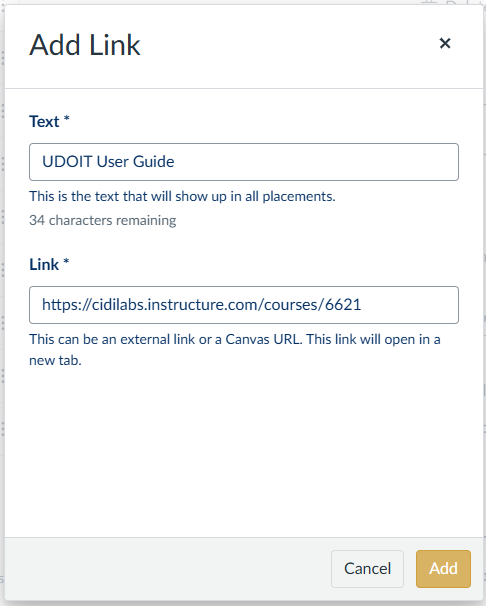
Say goodbye to the external Redirect Tool! Canvas now includes a way for faculty to add additional links to the course navigation.
- Select Settings in the course navigation menu
- Go to the Navigation tab
- Select the Add a Link button located underneath the list of active course navigation items
- Add your Text and Link. The link can either be an external link or a Canvas URL.
- Use the gold Add button to save the link
- Use the Save button to save your course navigation
New DesignPLUS Tools
The Cidi Labs developers have added several new tools to DesignPLUS over the last few months.
QuickStart Wizard
The QuickStart Wizard allows users to add Templates and Content Blocks to an empty Canvas Page, Assignment, Discussion, etc. without opening the full DesignPLUS Sidebar. Review the QuickStart Wizard User Guide to learn more.
Course External Assets
Ever wished the Canvas Link Validator had more functionality? Cidi Labs has solved that problem. Try out the new Course External Assets tool to import external files and images to ensure students can see and open everything they need in your courses.
Design Assistants
The DesignPLUS Design Assistant panel has been enabled and is ready for you to use to organize and enhance your content. Keep in mind that the tool is still in beta, which means you need to enable beta tools to access it, and you may encounter unexpected issues or glitches.
You can use the Design Assistant to automatically:
- Organize content into accordions, expanders, or tabs
- Be sure to explicitly tell it not to alter your content, or it may make changes that you don’t want.
- Generate distractor answers in Quick Checks
- Build Flashcards, Fill-in-the-Blanks, Sort Items, and Order Items interactive activities from a given topic or list of terms
- Suggest headings for your content
- Suggest alt text for images
- Suggest icons
All Design Assistant content should be reviewed and can be easily edited once it is added to the Rich Content Editor.
New Quizzes Functionality
As of July 27, 2026, the DesignPLUS Sidebar is finally available in New Quizzes. This tool is also still in beta, so make sure you have beta tools enabled if you would like to use this feature.
Introducing SpeedFIXIT in UDOIT
SpeedFIXIT provides users with the ability to more rapidly fix color contrast, image, and link-related issues in UDOIT. The feature is located in the UFIXIT tab of UDOIT. It allows users to easily approve suggestions (some powered by AI) as well as edit/add fixes for image, link, and color-related issues. Watch the video below to learn more. (Feel free to jump to the 1:07 bookmark in the video.)
TidyUP: Course Cleanup Tool for Canvas
TidyUP is a tool faculty can use to easily declutter their Canvas content and files. Watch this short video and review the TidyUP User Guide to get started.